
Abandoned cart emails: the flow Growthly sets up for you
What the Abandoned cart recipe sends, when it sends it, and what to change before you turn it on.

Someone adds a product to their cart and leaves before paying. Growthly’s Abandoned cart recipe is a ready-made flow for that moment: a reminder, a wait to see whether they come back, and one more nudge for the people who don’t. Here is what each step does, so you know exactly what it sends and when.
When a cart counts as abandoned
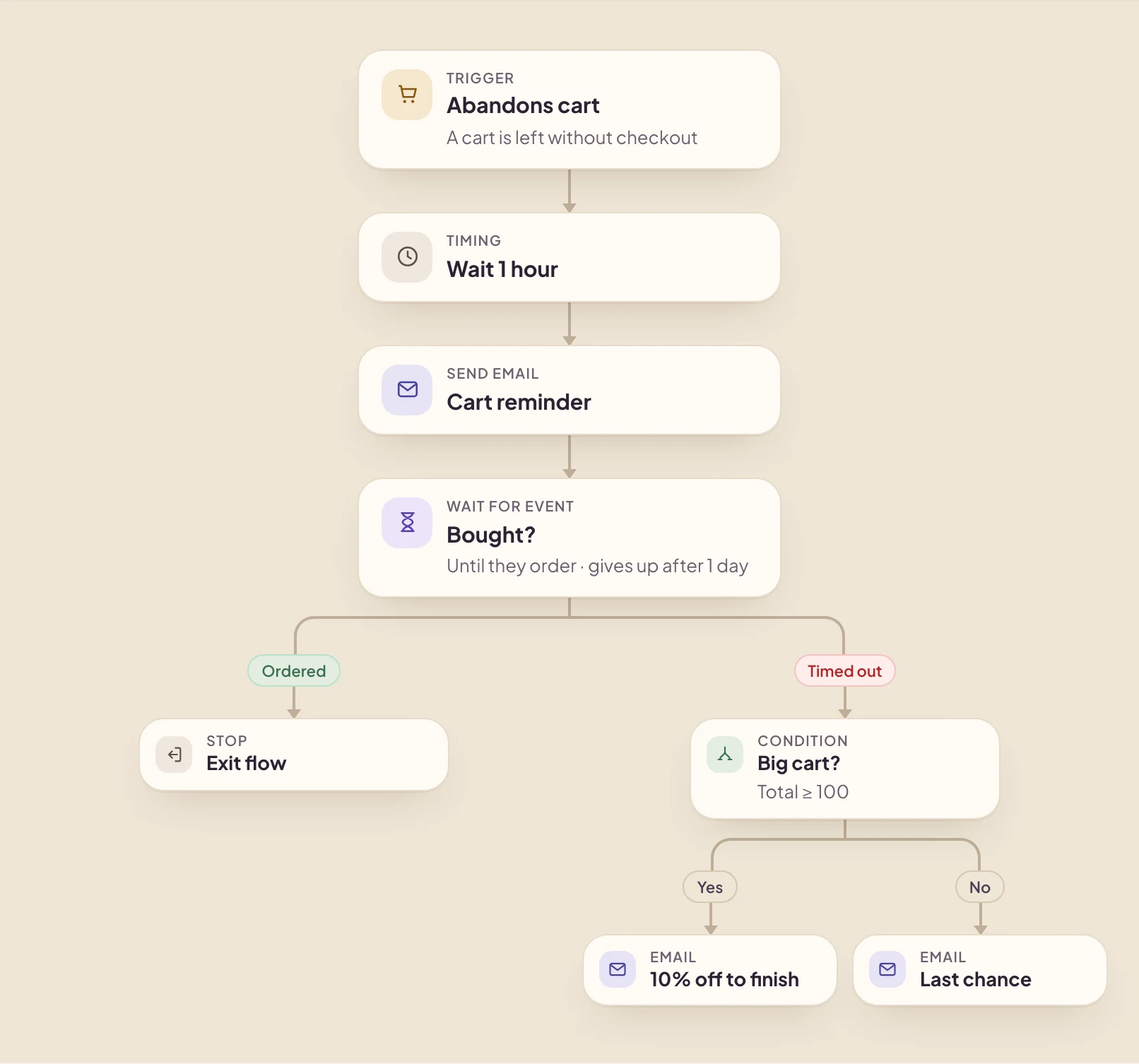
Carts come from your connected store. When a cart has had no activity for an hour, Growthly marks it abandoned and fires the Abandons cart trigger. The check runs every ten minutes, so the trigger fires a little over an hour after the shopper’s last change.
A shopper can enter the flow again after 7 days. If they leave another cart the next day, they won’t get a second round of reminders that soon.
The steps, in order
- Wait 1 hour. This gives them time to come back on their own. Together with the hour it takes to count as abandoned, the first email lands about two hours after they left.
- Send “Cart reminder”. The recipe starts from the “Bundle and save — basket reminder” template, which lists the items still in their cart.
- Wait for the order. The “Bought?” step waits up to a day for an order.
- If they ordered, the flow ends. Nobody gets a reminder for something they already bought.
- If they didn’t, check the cart size. Carts of 100 or more get “10% off to finish”. Smaller carts get “Last chance”.
Why it waits for the order
The wait step is what keeps the flow polite. It listens for an order for up to a day, and the moment one arrives, that shopper leaves the flow. Without it, someone who came back and bought would still get a discount offer the next day.
Save the discount for bigger carts
The recipe only offers money off when the cart total is 100 or more. Smaller carts get a plain last reminder. Change the amount in the condition to match your margins, or remove the split if you’d rather treat every cart the same.
For the code itself, you can hand out one code to everyone, upload a list of unique codes, or let Growthly create a unique code per shopper in Shopify, WooCommerce or BigCommerce.
Before you turn it on
- Open each of the three emails and apply your brand kit, so the logo, colours and fonts match your store.
- Adjust the waits if an hour is too soon or too late for what you sell.
- Do a test run on one contact. It walks the draft step by step, so you can check every email.
- Fix anything the health check flags, such as a missing postal address, which anti-spam law requires in marketing email.
How to see if it is working
Open the flow’s Report tab to see how many people entered, how many emails went out, and the opens and clicks on each step. Orders are credited to the email the shopper clicked within 5 days, or opened within 3 days, so the revenue you see comes from people who actually engaged with a reminder.